
If you play Rainbow Six Siege, you have probably come across R6 Tracker while checking your rank, K/D, match history, operator stats, or another player’s performance. The service can make a lot of game information easy to find, which is useful when you want to compare stats, but not everyone wants their profile to be publicly visible.
So, how do you private R6 Tracker?
The short answer is that R6 Tracker privacy depends on what information you are trying to hide and which privacy controls are currently available through Tracker Network and Ubisoft. R6 Tracker is a third-party statistics service, so changing a privacy option inside Rainbow Six Siege does not automatically mean that every statistic displayed by R6 Tracker will disappear. Before changing anything, it is worth understanding the difference between your Ubisoft account, Rainbow Six Siege’s own privacy features, and your R6 Tracker profile.
Can You Make Your R6 Tracker Profile Private?
R6 Tracker is part of Tracker Network and provides player statistics for Rainbow Six Siege. Its profiles can contain information such as ranks, seasonal statistics, match history, and other performance data. Tracker Network has continued to update its R6 Siege profile and match-history system for both PC and console players.
The confusing part is that there isn’t one universal “make everything private” switch that should be assumed to control every piece of Rainbow Six Siege information on the internet. If your goal is to reduce the amount of information that other players can see, you should first check the privacy controls associated with your Tracker Network account and then review the privacy options available through Ubisoft.
The exact names and location of settings can change as services update their websites, so if you do not see an option described in an older tutorial, do not assume that you are missing something. Look for the current privacy or account controls associated with your profile.
How to Private R6 Tracker
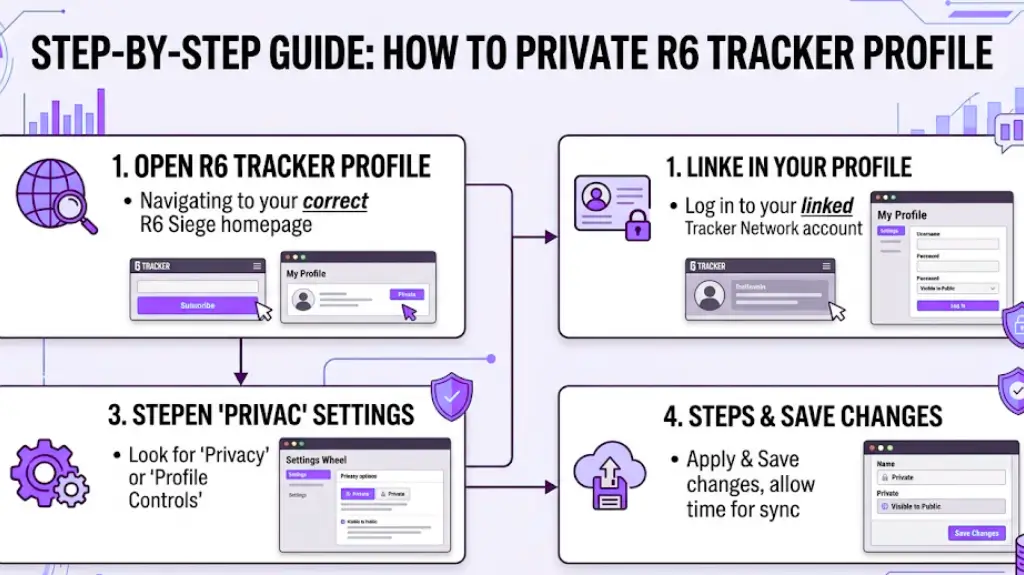
If your main goal is to make your R6 Tracker information less publicly accessible, start with Tracker Network rather than changing random settings inside the game.
Here is the general process to follow:
1. Open Your R6 Tracker Profile
First, open the R6 Tracker website. After entering the website, locate your personal Rainbow Six Siege homepage. Do not rush to perform any operations once you find the page; you must double-check to confirm that the page you have opened is the correct one corresponding to your account. Even the gaming platform you logged in with must match the one you actually use to play the game, with no room for any errors.
The reason this website can pull up the homepages of so many players is that it locates accounts through the unique identification codes that come with different platforms and different accounts. Precisely because it can pull up all matching account homepages using this information, you must check carefully. Confirming that you have entered your own correct homepage is extremely important.
If after browsing for a while you discover that the page you have opened is not your own, but another player’s homepage, do not directly look for operation options. First switch the page back to your own. Wait until you have entered your own homepage, then look for the exclusive operation options bound to your account.
2. Sign In to Your Tracker Network Account
If your profile page has already been linked to your Tracker Network account, you must use the account information bound to your R6 Tracker profile page to log in. You must get this step right, otherwise you will not be able to modify the privacy settings of your profile page. Even if you open a public profile page that is accessible to everyone, you will not find the entry to modify the privacy settings just by opening and viewing that page. All setting options available at the account level can only be accessed and operated after you have logged in.
3. Look for Current Privacy or Profile Controls
First, log into your account, then navigate to the three types of settings to locate the option you need to modify, these are account settings that manage your entire account, settings related to your personal profile, and the dedicated privacy settings page. The specific option you are looking for is the one that controls whether your account information can be viewed publicly by others.
Because Tracker Network’s website pages and the features on them may be adjusted at any time, do not use old screenshots you saved previously to locate buttons or menu positions; the positions marked on those screenshots have long changed, and you will not find anything by following them. Over the years, this platform has made multiple major adjustments to the personal profile features for Tom Clancy’s Rainbow Six Siege, including match records, battle reports, seasonal stats, and all other features related to personal profiles, all of these have been modified, so it is completely normal for their interface positions to be completely different from before.
If you find the usable privacy control option in your account, do not rush to click to enable it. First read the description text next to it carefully before operating. Do not only check whether the setting is labeled “private”; the key is to understand exactly what specific information this setting will affect. Do not enable the wrong setting, which would leave content you do not want to make public unprotected, or accidentally turn off information that you originally intended to display.
4. Save the Setting
First, in your account settings, locate the privacy setting option that meets your needs, turn on this feature, and be sure to save this modification; otherwise, the settings will not take effect. After saving, do not rush to check immediately. Wait for a short while first, leaving enough time for the system to synchronize and update your account profile page to the new setting status. When the update is almost complete, do not view it while logged into your own account. Test it using an alternative method: either log out of your account in the browser you are currently using, then open the profile page; or open it directly using a completely different account. In this way, you can clearly see what content about you an ordinary person other than yourself can view online.
The results obtained from this test are far more accurate than what you would see by simply opening your own profile page while staying logged into your account. The reason for this difference is that as the account holder, the system will sometimes show you information that ordinary visitors cannot see. The content you see while logged into your own account is completely different from what outsiders see.
5. Check Your Public Profile Again
Open your R6 Tracker personal profile as an ordinary visitor, do not log in to your own account, and view your page just like a passing stranger. Check one by one all content still visible on the page in this state, including your in-game data, rank information, match records, and other details on the homepage; you must scan all information that is still displayed publicly.
If any information you originally intended to hide is still clearly displayed, do not immediately conclude that there is a problem with your privacy settings. Do not rush to assume that the platform’s settings have failed; there are other possibilities.
This content that remains visible may be governed by another independent system, which is not within the control of the privacy settings you just adjusted; it is also possible that the data you see was never within the scope of protection of the privacy option you selected, and the hiding function you chose simply cannot cover the content you wanted to conceal.
What Happens After You Make R6 Tracker Private?
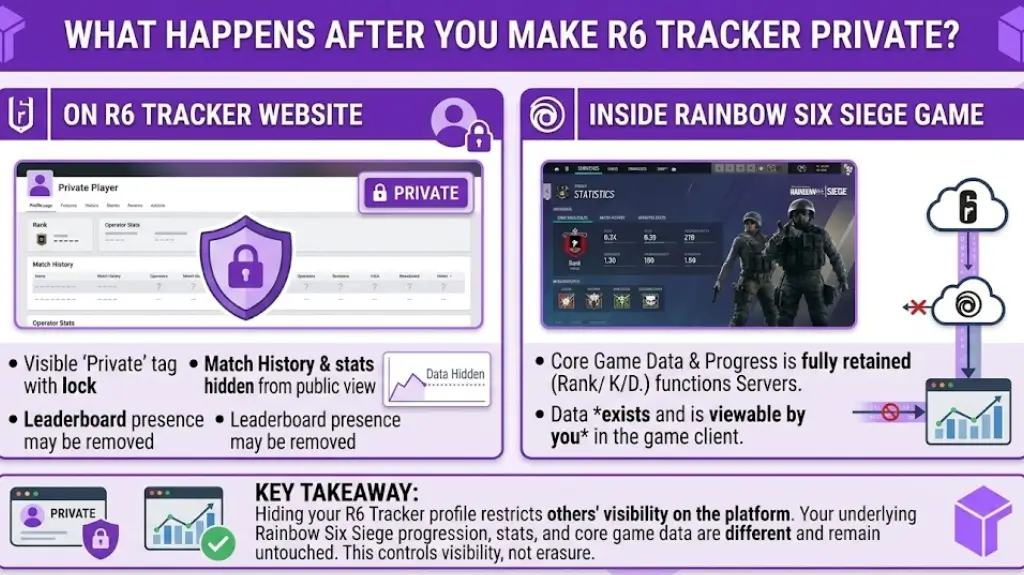
There is no unified standard for this matter; it all depends on the specific privacy control tool you are using. Simply put, if the function you use to adjust privacy permissions is different, the effect it can produce will be completely different, and it cannot be generalized. Even if you set your personal homepage or a certain piece of information to be visible only to certain people, your Rainbow Six Siege stats will not be automatically deleted, hiding content that others can see on one platform does not mean those records stored in the game will disappear along with it. Even if third-party websites no longer publicly display part of your information, your original game progress will still be retained. These core data stored in the game are fundamentally different from the content used for display on third-party websites; they will not have your original game progress deleted just because the website has removed the public display information.
Think of it this way:
The original data stored in your game is fundamentally different from your public personal homepage on R6 Tracker. To put it simply, the former is the gameplay traces automatically recorded by the system on the game server when you play the game, while the latter is just a separate display page created by a third-party website that organizes these traces. The two are not the same thing, and they cannot be handled with the same operation.
The purpose of the website R6 Tracker is to collect all kinds of statistical data from games like Rainbow Six Siege, and organize these scattered data into an easy-to-view format, allowing players to easily check their own gameplay performance. There is no need to flip through various in-game menus to piece together numbers; you can see everything at a glance by opening the website’s page. The services that this platform currently offers for R6 Siege include features such as match records and match reports. All public personal homepages will display all statistical data bound to the player’s account, which anyone who clicks into the homepage can view.
If your goal is to protect your privacy, do not rush to set a certain homepage to a private status and assume that you can delete the underlying game data. You must understand that you have only closed the access permissions for that display page; the original data stored in the game will not be affected by this operation at all, and will not vanish out of thin air. The real effort you need to put in is to first figure out which information is actually publicly displayed, and only by adjusting privacy settings for the content that others can actually see will your actions be useful.
Can You Hide Your R6 Stats From Everyone?
That is not what really happened; many Rainbow Six Siege players still mix up two entirely separate things to this day. The two actions you take to conceal your information are fundamentally not the same thing, one is hiding your personal information on R6 Tracker, and the other is adjusting the permissions for all your data that is directly managed by Ubisoft. There is an essential difference between these two actions, so completing the first one will never resolve the second.
Ubisoft’s privacy policy clearly states that its services may collect and process your in-game behavior and various types of data, and functions that display personal information to the public, such as public leaderboards, are standard features of the platform. Even if you hide your information on third-party platforms, Ubisoft’s public disclosure mechanisms will continue to operate as normal, and the relevant information will still be displayed publicly. Ubisoft has also set up an entry in its own Privacy Center for players to adjust the visibility scope of their social interactions and data. To modify the settings on Ubisoft’s side, you must operate through that entry separately; changing settings elsewhere will not make this adjustment take effect automatically.
Put simply, if you modify your privacy settings on one service, this adjustment will not automatically sync to every platform that stores your data. If you turn off public display on one platform, all other platforms will remain in their original state and will not change alongside it.
For example, you will have all of the following at the same time:
- A Ubisoft account that stores all your core game information
- Rainbow Six Siege game data bound to each of your matches
- A Tracker Network profile that displays part of your in-game performance data
Public leaderboards and social information directly released to the public by Ubisoft through its own services
All of this content is bound to your in-game identity, but they are not part of the same system and cannot be linked and synced. The privacy settings of each platform are independent, so if you modify the settings for one, the others will not change along with it. If you want your Rainbow Six Siege data to disappear completely from every platform that can access it, setting your profile to private on that third-party statistics platform alone is completely insufficient to achieve that goal. The public leaderboards managed by Ubisoft, and the relevant information publicly synced from your Ubisoft account, will still be searchable as before, they will not be hidden just because you modified the settings on a third-party platform.
R6 Tracker vs. Rainbow Six Siege Privacy Settings
The easiest way to understand the difference is to separate the services.
| Platform or Feature | What It Controls | Does It Automatically Hide R6 Tracker Data? |
| R6 Tracker / Tracker Network | Third-party statistics and profile presentation | Not necessarily |
| Rainbow Six Siege | In-game features and privacy-related options | No automatic guarantee |
| Ubisoft Account | Account, social and personal-data preferences | Does not automatically control every third-party website |
| Public leaderboards | Publicly available ranking information | Depends on the relevant Ubisoft feature |
| R6 Tracker profile | Information displayed by Tracker Network | Depends on the current Tracker Network controls |
Ubisoft itself states that social features can involve usernames, gameplay activity and statistics, and that some information can be publicly visible in leaderboards or during game streaming. The takeaway is simple: don’t treat Ubisoft privacy settings and R6 Tracker settings as one system.
Why Is My R6 Tracker Profile Still Showing?
If you have adjusted your privacy settings, thinking that after the change your personal profile would no longer be searchable, but it can still be found, there are several possible reasons for this situation, let us sort them out one by one. First, check the most basic point: whether you have actually modified the settings on the correct account. This is especially important. If you have played Rainbow Six Siege on multiple platforms, or own multiple Ubisoft accounts and multiple Tracker Network accounts at the same time, it is very easy to log into the wrong account to adjust settings, and you might unknowingly change the privacy settings of another account, which naturally will not work. Therefore, you must first confirm that you have modified the settings of the exact account you intend to use.
Next, you can log out of your account, clear your browser’s login information, and then try searching for that profile as a regular visitor. When you are logged into your own account, the system will show you more personalized content, which is completely different from the page that strangers see, being able to search for your profile while logged into your own account does not mean that other visitors can also find it. In addition to the impact of login status, there are two other common minor issues that can mislead you: one is that you have opened an outdated cached version of the webpage, that is, an old page saved by your browser earlier, which has not loaded the latest status after you modified your privacy settings; the other is that the information you see is not pulled from the latest data source of the current platform, so the source does not match. One more thing to note: Ubisoft and the third-party Tracker Network tools do not always display information in exactly the same way, there may inherently be differences in the data presentation between the two sides, so do not mix up your judgment criteria.
Finally, remember that privacy control-related settings can change, they do not always stay the way you have seen them before. Certain settings mentioned in old YouTube videos and old forum posts may have already been removed with version updates, and the operation interfaces shown in those posts may have also been fully redesigned, which are completely different from the pages you see now. In recent updates to Tracker Network, a large number of adjustments have been made to the personal profiles for R6 Siege, so you must be very careful when using those outdated old operation guides, do not modify settings blindly following the steps in old posts, they will not match the current settings at all.
Can Other Players Still Track Me in Rainbow Six Siege?
As soon as you hear the word “track”, it is easy to form a preexisting bias and think this matter is extremely serious, as if your privacy has been completely breached. But in reality, it is not nearly that frightening at all.
If someone finds your R6 Tracker personal homepage, that does not mean they can log into your Ubisoft account. Public statistical homepages of this type are originally designed to display game-related information collected and organized by tracking services; their very purpose is to let people view this content. Being able to see this content is a completely separate matter from gaining access to your password, private messages, payment information, or any other private account data, the former only lets someone see your in-game match statistics, while the latter would allow them to directly control your account and access your personal assets, and they are fundamentally different in nature.
If you are worried about account security, do not fixate on who can view your R6 gameplay data; focusing on protecting your core Ubisoft account is what truly matters. Set a complex, unique password for this account that is only used to log into it, keep all your login credentials properly secured, and never disclose them to outsiders at random. Even if another player claims they need your Ubisoft login information to help you hide your R6 gameplay data, you must never hand over that information.
Does Making R6 Tracker Private Delete Your Stats?
That’s wrong. Privacy settings are an entirely separate matter from deleting data. Many people mix these two things up, thinking that as long as they turn on privacy protection, the stored game data will disappear along with it, but that is completely not the case. When you flip a privacy switch to block certain statistical data from being publicly visible to others, that does not mean that data vanish from Rainbow Six Siege or from the underlying data of your account. They remain securely stored on the game’s servers, within all the data bound to your account; the only difference is that no one besides you can access that content on public pages.
The rank, match records, K/D, operator performance, and all other game information stored in your account, their existence is a completely separate issue from how third-party data tracking websites display that information. Those third-party platforms are sites independent of the game’s official developers. Even if the platform cannot scrape and display your data because of your privacy settings, the data stored in your game and your account itself will not decrease by a single bit. That is why we must understand the function of “privacy” as controlling whether other people can see your information, rather than thinking that turning it on will automatically erase your game records.
What If You Cannot Find a Privacy Setting?
If you open R6 Tracker and look for a specific setting following an old tutorial, but cannot find the corresponding option no matter how much you search, never randomly modify any settings on Ubisoft’s platform that are unrelated to this issue, many people, when panicked, will start tinkering with options on other platforms, which only causes new problems for no reason.
You must first check the account status of the Tracker Network you are currently logged into, then see what usable official support options come with the platform. Why can’t you find the settings mentioned in the old tutorial? In fact, the interface of this tool changes at any time following official function resets. Over the years, the profile page of R6 Tracker has already received major version updates; its interface layout and option locations are completely different from what they were years ago. It is very common for it to not match the old tutorial, and this is not a mistake in your own operations.
In addition to verifying your account status, you need to confirm one more thing: your personal profile in R6 Tracker is indeed stably bound to the Tracker Network account you are currently logged into, with no issues of binding the wrong account, or the connection failing and not being properly linked.
If you have checked all the items that should be checked and still cannot find the corresponding privacy control settings, there is only one safest solution: directly contact the customer service of Tracker Network for help. Stop operating blindly following those outdated old tutorials. Those old guides that have long failed to keep up with version updates are very likely to give you wrong instructions, and following them will only make things worse and create a whole bunch of unnecessary troubles.
Conclusion
If you searched for how to private R6 Tracker the main thing to remember is that R6 Tracker, Rainbow Six Siege and your Ubisoft account are not the same system. Start by checking your Tracker Network profile and its current privacy controls. If you locate a setting that limits public visibility, activate it, save the change, and then visit your profile while signing out to validate what other people can actually see.
Don’t assume the privacy setting is broken if your stats are still visible. The information may be coming from another part of the Ubisoft ecosystem or from a different profile or platform.Most importantly, don’t confuse hiding a statistics profile with erasing your gaming data. These privacy controls are mostly about who else can see information. Your underlying Rainbow Six Siege progress, and Ubisoft account data, are another story. Ubisoft’s own documentation confirms that gameplay activity and statistics can be processed as part of its services and that some information may be publicly visible through certain social features and leaderboards. For the most accurate instructions, always use the current Tracker Network interface rather than relying on an old guide or video. R6 Tracker’s profile system has changed over time, so current settings are more reliable than screenshots from previous versions of the website.
Want to explore more practical insights on AI, technology, digital marketing, and Gaming Technology? Read more informational articles on the Refrens AI Blog to discover useful guides, tips, and industry insights.
FAQs
Can I make my R6 Tracker completely private?
That depends on the privacy controls currently available for your Tracker Network account and what information you are trying to hide. Do not assume that one setting controls every Rainbow Six Siege statistic across every service.
Can I hide my Rainbow Six Siege stats?
You may be able to limit the visibility of certain information, depending on the privacy controls provided by the relevant service. But hiding information from R6 Tracker is not quite the same as hiding it from Ubisoft or other sources of stats.
Can someone still find my R6 Tracker profile?
If your profile or associated information remains publicly indexed, it may still be discoverable. The best way to check is to change any privacy settings that are available and view your profile while logged out.
Does making my profile private delete my R6 stats?
No. Privacy controls generally concern visibility. They should not be treated as a command to erase your Rainbow Six Siege progression or account history.
Why can people still see my stats?
They could be viewing information from a different source, a different platform profile or information not affected by the privacy setting you changed. Cached pages and outdated tutorials can also make the situation confusing.
Does this work on PC and console?
R6 Tracker supports Rainbow Six Siege profiles for both PC and console players. Tracker Network has specifically described its R6 Siege profile updates as covering PC and console players.
Can I make my profile public again?
If the current Tracker Network privacy controls provide a public/private option for your profile, you should be able to change the relevant setting again. The exact controls and interface may change over time.
